
Donor Wallet
The donor wallet sends transactions and pays gas.
It allows the rescue flow to be sent even when the original or compromised wallet should not pay gas directly.
Why the Donor Is Needed
The donor:
- Pays gas
- Sends the prepared rescue flow
- Can execute EIP-7702 flows
- Can send permit rescue flows
- Can withdraw its own leftover assets through Donor Asset Withdrawal
How to Create a Donor
- Open
https://antidrain.me/workspace. - On the first step, press Generate Wallet.
- Press Export Backup and save the file.
- Copy the donor address.
- Fund it only when the site shows the required amount.
How to Import a Donor
If you already have a donor:
- Press Import Wallet.
- Paste the private key or another supported format.
- Check the address.
- Press Export Backup if this donor is new to you.
Backup
Backup lets you restore the donor later.
Check Your Downloads Folder
The site can start the backup download, but the browser does not always prove that the file was actually saved. Check your Downloads folder or selected folder manually.
Show / Hide Private Key
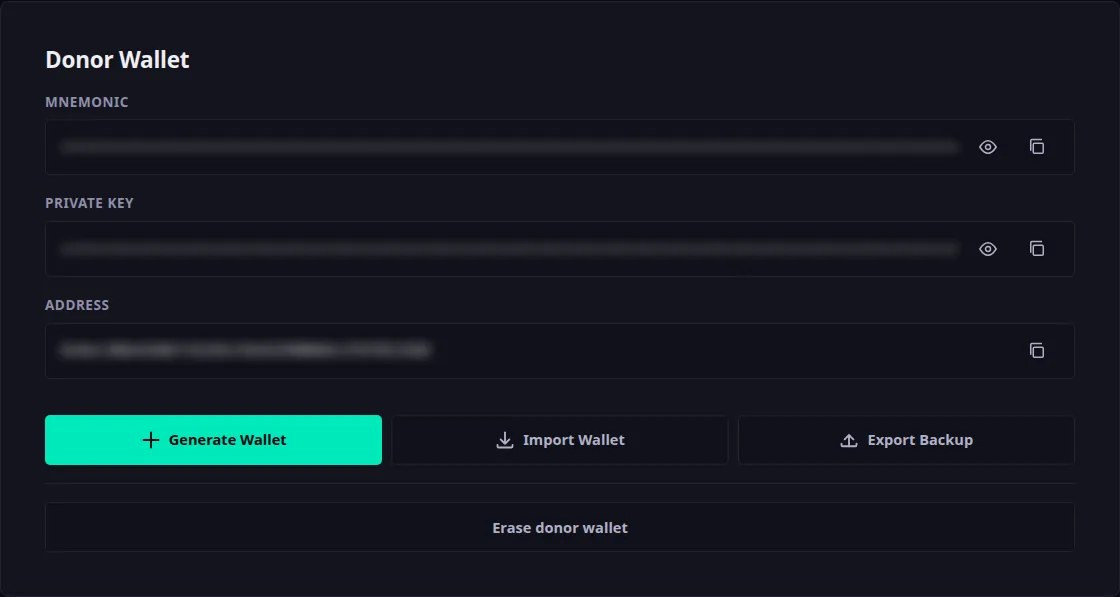
The Show private key button reveals the value; the same button then reads Hide private key. Use it only when there is no screen share, screen recording, or other person nearby.
After a page reload, the private key should be hidden again.
How to Erase the Donor Wallet
When the rescue is over, you can remove the donor wallet from this browser. The button reads Erase donor wallet and sits in two places. On the donor step it has a row of its own, below Generate Wallet, Import Wallet and Export Backup. The second place is the send controls, on the TX Sender step.
Each place has its own single reason for the button to be unavailable, and the two reasons are not the same:
- On the donor step the button is live as soon as a donor wallet exists — before you choose an action, before any transaction is built or sent. It is disabled only while this browser is holding no donor wallet: Nothing to erase yet: this browser is holding no donor wallet. Generate or import one first.
- In the send controls the button is disabled until the rescue transaction is confirmed: Available once the transaction is confirmed. The donor wallet signs and pays for the rescue, so it has to stay until then.
Pressing it never erases anything straight away. A dialog opens first, titled Erase the donor wallet?, with two buttons: Keep the donor wallet and Erase and reload. Nothing is deleted until you choose Erase and reload.
The dialog lists four consequences. The first and the last are the same wherever you pressed the button; the second depends on which of the two places you pressed it from, and the third depends on what this browser does with pasted keys. Everything else about the dialog is shared. Read the dialog you actually get before you accept it.
Erasing deletes the donor wallet from this browser: its recovery phrase, its private key and its saved copy.
Withdraw the Leftovers First
Whatever is still sitting at the donor address stays there, and without the backup file nothing in this browser can reach it again. Withdraw the leftover gas and tokens through Finish — Manage Donor Assets before you erase — see Donor Asset Manager.
Check What the Dialog Says About Your Pasted Keys
The third point in the dialog is about the compromised wallet keys you pasted, and which of two sentences it shows depends on this browser. One says the pasted keys stay in this browser for the next transaction. The other says: This browser is not saving what you paste — the compromised wallet keys exist only in this tab, so the reload takes them with it. Have them to hand before you confirm. If you see the second one, have those keys in front of you before you press Erase and reload — the reload takes them, and nothing on this site can give them back.
The Attacker Can Delegate Again
The attacker can delegate the compromised wallet again, and a follow-up rescue needs a new donor with gas on it.
What the Reload Takes with It
From the send controls: the page reloads, this report closes and the flow starts over at step one, so copy the transaction hash above the button before you confirm if you still need it.
From the donor step: there is no report and no hash there. The action you picked and the step you had reached are cleared along with the donor, so a rescue already under way has to be set up again from step one.
Either way, transactions already sent stay sent, nothing on the blockchain changes, and your rescued funds are unaffected.
If the Erase Does Not Finish
Erasing can also fail, and a message below the button says which of two things happened. They are opposites, so read which one it is:
- Nothing was erased. This browser is blocking storage for the site, so the donor wallet is still here — exactly where it was, with nothing lost. Close the tab to drop it from memory, then clear this site's data in your browser settings.
- Only part of it was erased. This browser stopped letting the site delete its own data half-way through, so some of the donor wallet may still be here while the rescue progress is already gone. The page is left as it is on purpose. Close the tab to drop the wallet from memory, then clear this site's data in your browser settings.
A Partial Erase Means the Key May Still Be on This Device
If the message says only part of it was erased, do not walk away treating the donor private key as gone. Part of the donor wallet can still be in this browser's storage even though the rescue progress is already lost. Clear this site's data in your browser settings, and until you have, keep treating that donor address as one this device can still reach.
When to Fund the Donor
Wait for Fund Donor Calculation
You do not need to fund the donor with a large amount in advance. Wait for the Fund Donor step. It shows the calculated required amount.
Next
- Workspace Flow — the steps the workspace is made of.
- Donor Asset Manager — how to withdraw leftovers after a rescue.
- Service Fees — what makes up the final amount.