
Rescue Actions
The site has several action types. Choose the one that matches your case.
If you are new, do not choose only by the name. First answer a simple question: what exactly do you want to do with the wallet or assets?
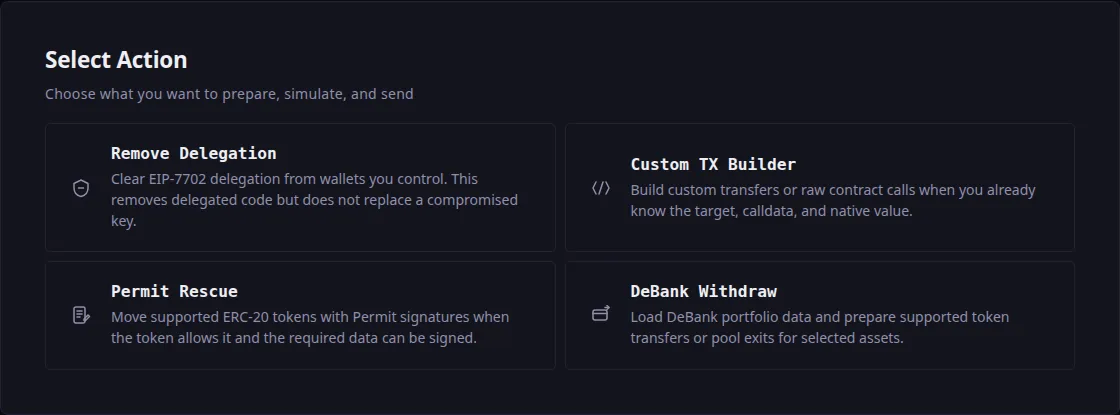
This is what the choice looks like on step two of the workspace:
Remove Delegation
This action clears EIP-7702 delegation from added wallets.
Use it when:
- The wallet has active EIP-7702 delegation
- You want to remove delegated code
- You want to stop future actions through that delegation
Important: Remove Delegation does not change the private key. If the private key is already compromised, it stays compromised.
In simple words: this action removes delegated code connected to the account. It is like disconnecting a risky add-on, but the wallet key itself stays the same.
Prepare:
- The private key of the wallet where delegation must be removed
- The correct network
- A donor wallet to pay gas
When to Stop:
- The site says there is no delegation
- Nonce loading fails — the nonce is the address's transaction counter
- RPC cannot check delegation
- You are not sure you added the correct wallet
Custom TX Builder
The Custom TX Builder action lets you assemble several transfers into one flow and send them together. It has four transaction types, and the type you pick decides which fields you have to fill in.
The order of work is the same for every type:
- Add the private key of the wallet you are rescuing assets from. You can add several wallets.
- Press Add Transaction and choose a type.
- Fill in that type's fields.
- Repeat for the remaining assets and wallets.
- Build the transaction and move on to simulation.
The donor key does not go here
This list takes the keys of the wallets you are rescuing from. The site will not accept the donor's private key here: the donor only pays gas and signs the send.
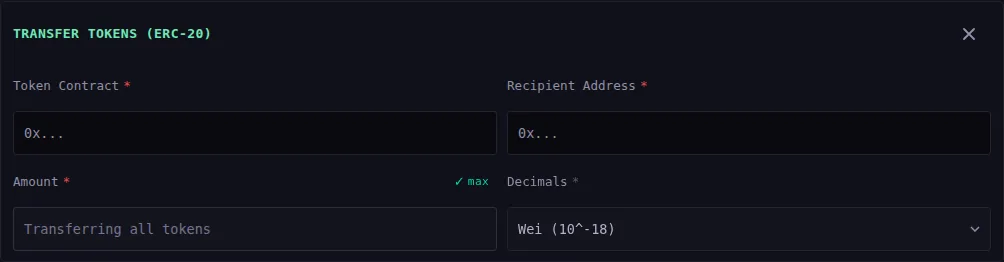
Transfer Tokens (ERC-20)
The most common case: USDT, USDC and most other tokens. Suitable for a beginner as long as you know the token's contract address.
Fields:
- Token Contract — the contract address of the token you are moving.
- Decimals — a unit dropdown, where
Wei (10^-18)corresponds to 18 places. Ordinary tokens use 18, but there are exceptions: USDT and USDC use 6. If you are unsure, check it in an explorer. - Amount — how much to move. There is a "max" toggle next to it: with it on, the field reads "Transferring all tokens" and the amount comes from the full balance at execution time.
- Recipient Address — your new safe wallet.
Transfer NFT (ERC-721)
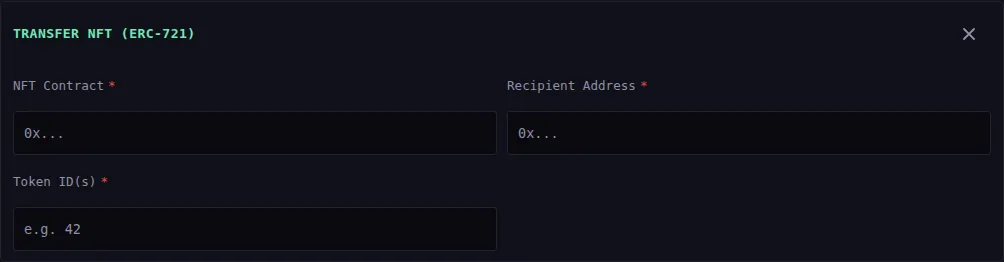
For NFTs that exist as a single copy. One item moves per transaction.
Fields:
- NFT Contract — the collection address.
- Token ID(s) — the item's number inside the collection, for example
42. - Recipient Address.
The fee here is not a percentage but fee units: one per NFT transfer.
Transfer NFT (ERC-1155)
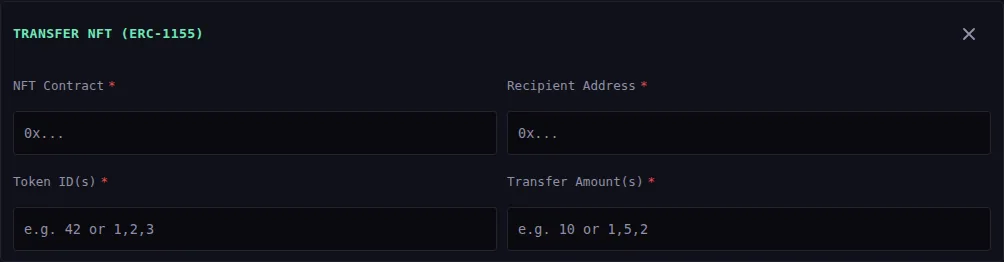
The same NFT family, except an item can exist in several copies and one transaction can move several different IDs at once.
Fields:
- NFT Contract.
- Token ID(s) — one number or several separated by commas:
42or1,2,3. - Transfer Amount(s) — correspondingly
10or1,5,2. The order must match the order of the IDs. - Recipient Address.
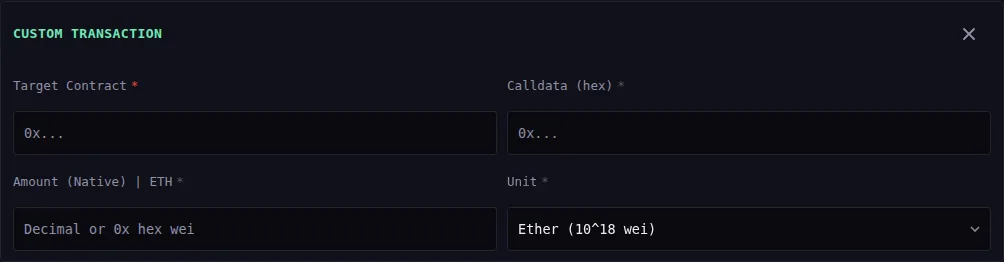
Custom Transaction
Full control over what goes to the network. Needed when an asset cannot be moved by an ordinary transfer — when you have to call a contract method, for example.
Fields:
- Target Contract — the address the call is addressed to.
- Calldata (hex) — the call data in hex form.
- Value (Native) — how much native coin to attach to the call, as a decimal or as hex wei. Usually
0. A Unit dropdown next to it picks the scale of that number:Etherorwei.
There is no recipient field here: where the funds go is decided by the calldata itself.
Do not use this type on a guess
The site sends exactly the data you entered and does not check what it does. A mistake in the calldata can send assets to the wrong place or burn gas for nothing.
If you do not know where to get calldata, use one of the three types above, or the DeBank Withdraw action.
Permit Rescue
Permit Rescue uses token permit signatures when the token supports the required standard.
Supported ideas:
- EIP-2612
- EIP-3009
- DAI-like permit
This action is useful when token transfer can be approved by signature instead of a separate approval transaction.
In simple words: some tokens let you sign permission for a transfer without sending a separate approve transaction. The site checks Permit support and asks you to generate permitData.
Prepare:
- Private key of the wallet holding the token
- Token contract address
- Recipient address
- Amount or balance-at-execution mode
- A clear deadline, meaning when the signature expires
When to Stop:
- The token shows No Permit or Unknown
- Signing fails
- The site asks you to regenerate permitData after changing amount, network, donor, or deadline
- You do not understand what amount will move or what minimum should arrive
DeBank Withdraw
DeBank Withdraw loads portfolio data from DeBank and helps prepare supported withdrawals.
The current flow focuses on supported Bundler token transfers and pool exits.
If DeBank does not show assets or returns an error, check:
- Network
- Wallet address
- RPC
- DeBank availability
- Whether the asset is supported by the current flow
In simple words: the site tries to find assets through DeBank and prepare withdrawals only for assets it knows how to handle. Not every DeFi position can be withdrawn automatically.
Prepare:
- Private key of the wallet with assets
- Correct network
- Recipient address
- Time for DeBank data to load
- Confirmation that selected token or pool positions are actually supported
Check Permit Compatibility
If a Permit token is selected inside DeBank Withdraw, sending may be unavailable for that variant. Use supported Bundler token transfers and pool exits when the site clearly allows you to continue.
Scenario Comparison
| Action | When to Use | What to Prepare |
|---|---|---|
| Remove Delegation | Need to clear EIP-7702 delegation | Private key of wallet, donor, correct network |
| Custom TX Builder | Need to move tokens or NFTs manually | Private key, contract addresses, recipient, network |
| Permit Rescue | Token supports permit signatures | Private key, contract address, recipient, deadline, network |
| DeBank Withdraw | Assets are visible in DeBank and supported | Private key, recipient, time for data load, network |
How to Choose
If you need to clear EIP-7702 delegation, choose Remove Delegation.
If you need to transfer normal tokens or NFTs through a prepared batch, choose Custom TX Builder.
If the token supports permit and you need a permit-based transfer, choose Permit Rescue.
If assets are visible in DeBank and the site supports the withdrawal, choose DeBank Withdraw.
If You Still Do Not Know
Do Not Guess
Do not guess. Use this safer order:
- Check the network and recipient.
- Create a donor.
- Choose the simplest action for one asset.
- Build the transaction.
- Run simulation.
- If the result is unclear, do not send.
Next
- Simulation, Funding, and Sending — what happens after building.
- Service Fees — what each action is charged.
- Affiliate Link — how the fee is split.